

Nano Banana User Guide
A historical guide to using the Nano Banana image transformation workflow. Learn how to create stunning visuals with text-driven prompts, master character consistency, and unlock the full potential of Google's nano-banana model
When I first landed on Nanobanana.co's homepage, I got that "oh — this is serious" vibe: a clean hero banner, bold claims about Gemini Flash image technology, and a big Try Now / Launch AI Image Editor button right where my cursor wanted to click.
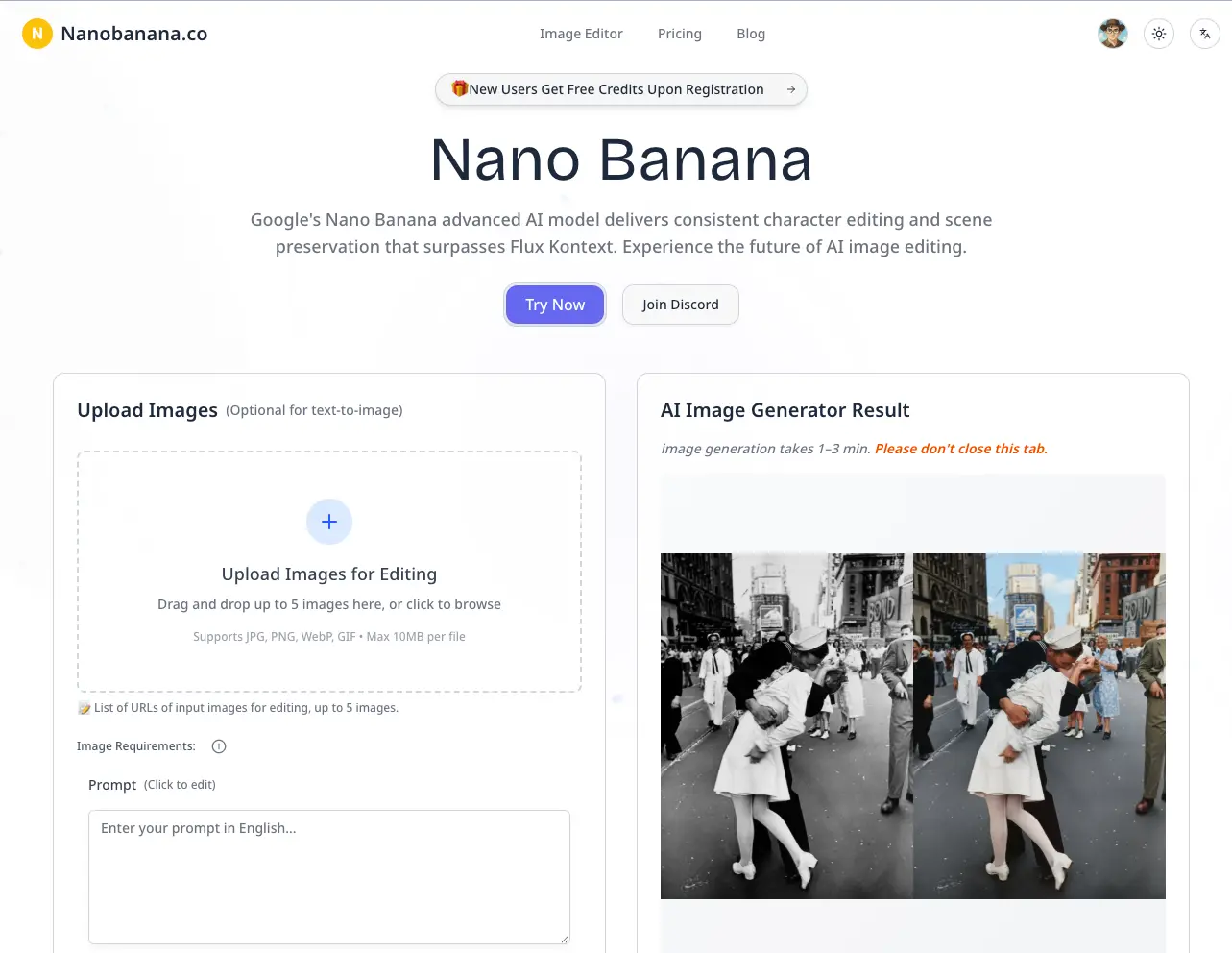
Nano Banana positions itself as an AI image-editing creative partner — it promises to preserve characters, lighting, and scene context while letting you write natural-language edits. That pitch immediately made me curious: could it really take me from zero to done without the steep Photoshop-style learning curve?
This guide is my honest walk-through from zero to finished image, structured using the 5W1H framework and SMART goal setting to ensure you get real results, not just entertainment.
Platform Overview: The 5W1H Framework
Who Should Use Nano Banana?
Nano Banana targets creators across all industries:
- Photographers: Professional retouching and restoration
- Designers: Rapid background swaps and visual concepts
- E-commerce: Product variants and lifestyle settings
- Marketers: Campaign visuals and social media content
- Content Creators: Thumbnail generation and branding assets
What Is Nano Banana?
At its core, Nano Banana is an AI-first image editor powered by Google's Gemini Flash technology.
Core Capabilities:
- Text-driven edits with natural language prompts
- Character-preserving transformations
- Background swaps and environment changes
- Multi-image merging and compositing
- Image restoration and style transfers
Technology Stack:
- Google's Gemini Flash for generation
- SynthID watermarking for authenticity
- Advanced content filtering for safety
When to Use Nano Banana
Perfect for scenarios requiring speed and consistency:
- Campaign thumbnail creation
- Product photography in lifestyle contexts
- Vintage photo restoration
- Virtual staging and concept visualization
- Social media content at scale
Where to Access
Web-based platform: novavideo.ai
- No software installation required
- Supports JPG, PNG, WebP, GIF (≤10MB)
- Browser-based interface with cloud storage
Why Choose Nano Banana?
Key Advantages:
- Character Consistency: Faces and people remain stable across edits
- Processing Speed: Gemini Flash delivers faster generation times
- User Accessibility: Natural language prompts eliminate technical barriers
- Quality Assurance: Built-in safeguards and watermarking
How It Works
The Complete Workflow:
1. Account Setup → Free credits provided
2. Image Upload → Drag & drop interface
3. Prompt Writing → Natural language instructions
4. Generation → AI processing (~30-60 seconds)
5. Refinement → Iterative improvements
6. Download → High-res assets in "My Assets"
Step-by-Step Walkthrough: From Zero to First Image
Step 1: Initial Setup and Account Creation
Homepage First Impressions: The landing page immediately communicates Nano Banana's core value propositions: background swaps, character preservation, and image merging capabilities. The prominent "Try Now / Launch AI Image Editor" button makes getting started intuitive.
Account Registration:
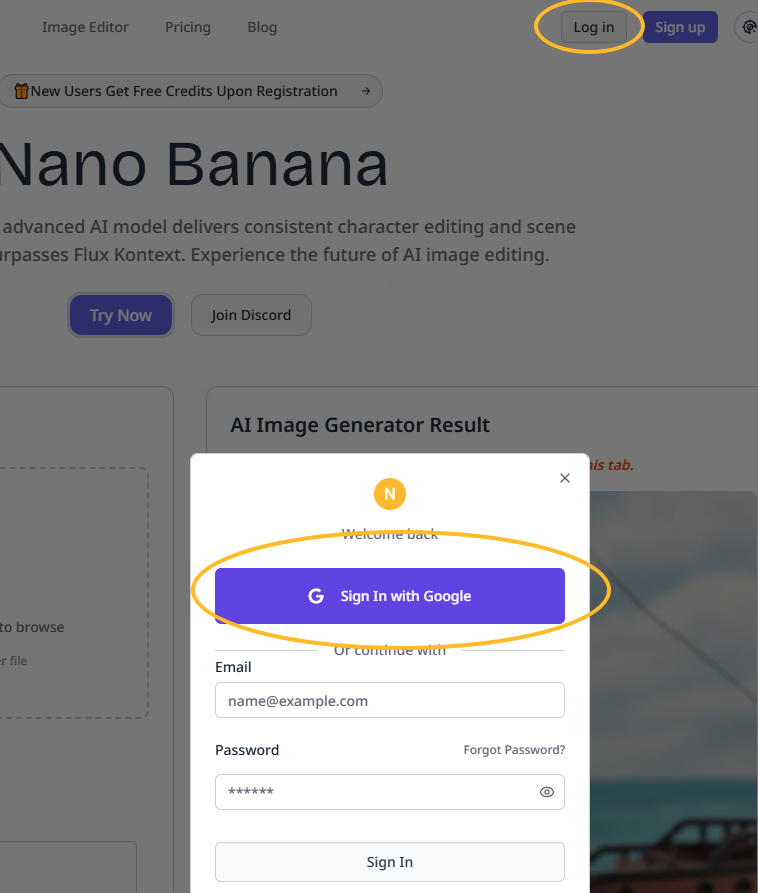
Nano Banana homepage with prominent "Try Now" button and registration options
- Simple email and password registration
- Immediate access to free starter credits
- No payment information required upfront
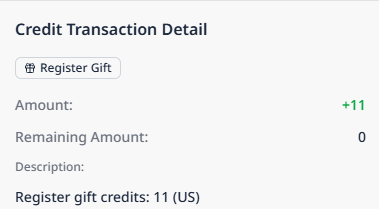
Step 2: Understanding Pricing Plans
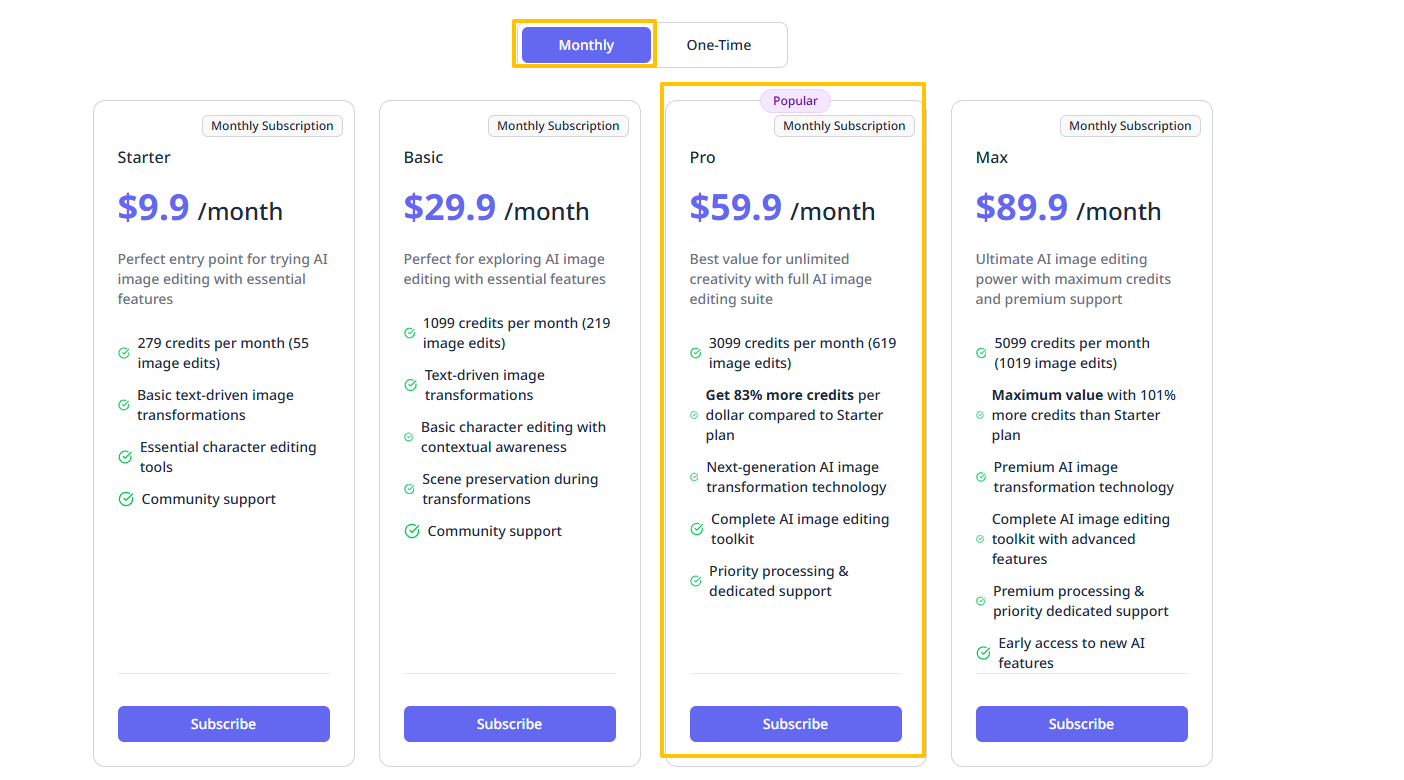
Pricing Structure:
- Starter: $9.9/month (~55 edits)
- Basic: $29.9/month
- Pro: $59.9/month
- Max: $89.9/month
Pro Tip
Start with free credits to test the platform before committing to a paid plan. Failed generations don't consume credits, making experimentation risk-free.
Step 3: Using the Image Editor
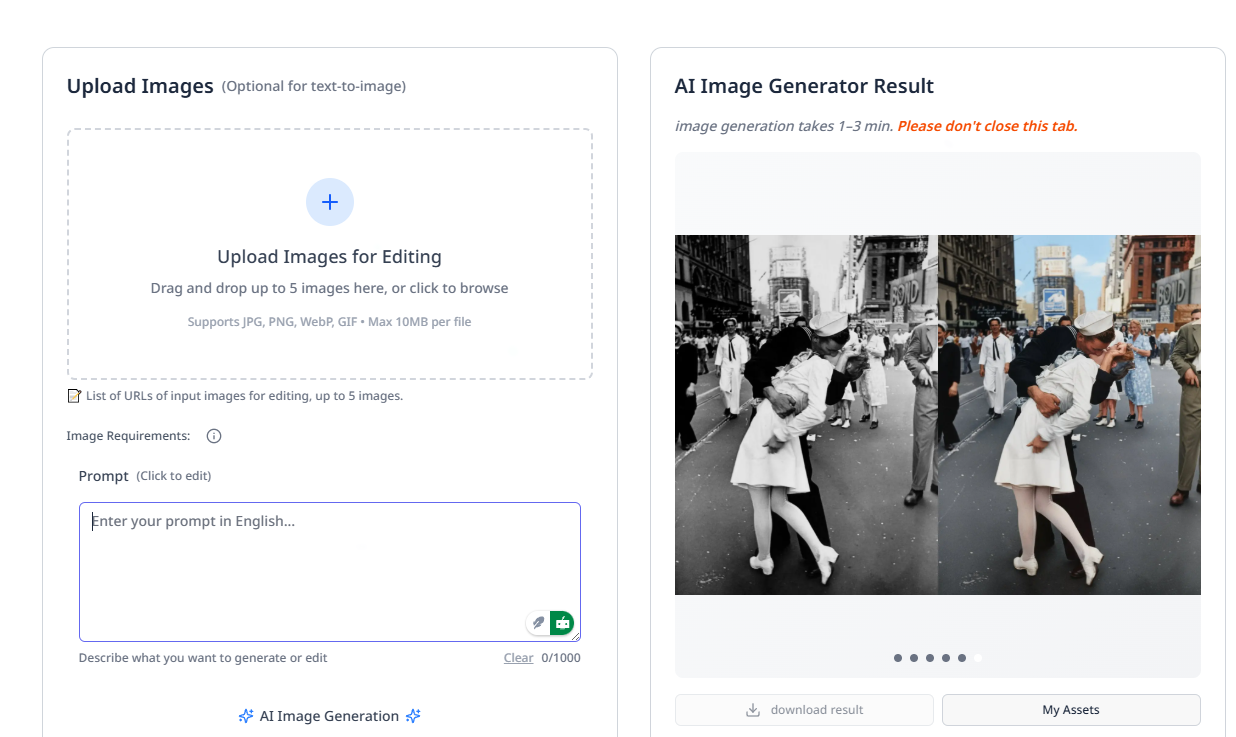
Interface Highlights:
- Clean, intuitive drag-and-drop interface
- Prominent prompt input box
- Single-click generation button
- Real-time credit balance display
Step 4: Crafting Effective Prompts
Example Prompt Structure:
Replace the cloudy sky with a warm sunset,
add a neon sign reading "OPEN" on the shop window,
slightly increase light on the subject's face
while keeping original facial features.
Best Practices:
- Be specific about desired changes
- Include preservation instructions for important elements
- Use descriptive language for lighting and atmosphere
- Break complex edits into clear, actionable components
Step 5: Generation and Review

Generation Process:
- Processing time: 30-60 seconds
- Real-time progress indicators
- Multiple result variations when applicable
- Immediate preview with download options
Step 6: Iterative Refinement
Refinement Prompt Example:
Reduce neon brightness by 20%
Preserve skin tone exactly
Refinement Strategy:
- Make incremental adjustments
- Focus on one element at a time
- Use comparative language ("reduce by X%", "slightly more", etc.)
- Reference previous edits for context
Step 7: Asset Management and Download
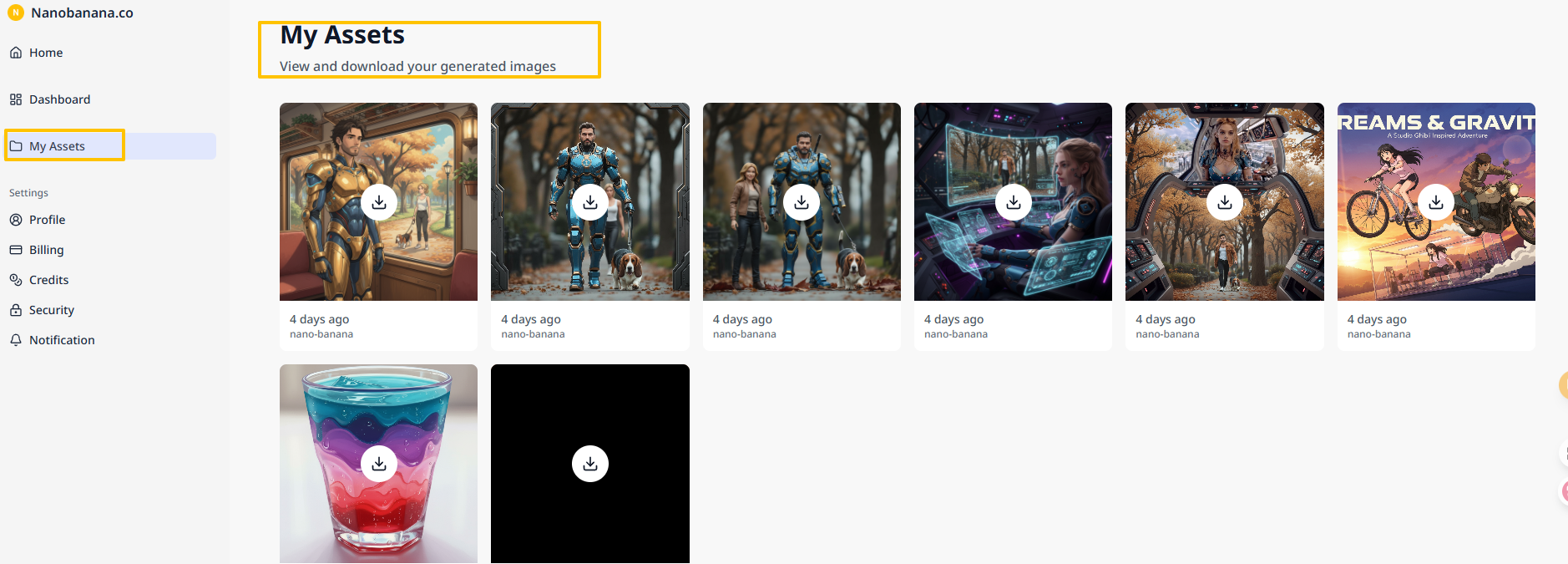
Download Features:
- High-resolution PNG format
- Organized in "My Assets" library
- Version history for iterative edits
- Bulk download capabilities
SMART Goal Framework for Maximum Results
While experimenting with Nano Banana is enjoyable, achieving real value requires strategic planning. The SMART framework ensures your image generation efforts deliver measurable business results.
SMART Methodology Applied
Specific: Define exact deliverables and requirements
- "Create 20 A/B test thumbnails for Campaign X"
- "Generate 15 product lifestyle images for Q4 launch"
Measurable: Track resource utilization and output quality
- Monitor edits used vs. credits available
- Measure generation success rate and refinement cycles
Achievable: Set realistic targets based on plan limitations
- Starter plan (~55 edits): 10-20 targeted projects
- Pro plan: Larger campaigns and batch processing
Relevant: Align image generation with business KPIs
- Focus on assets that impact CTR, conversions, or client deliverables
- Prioritize high-value use cases over experimental projects
Time-bound: Establish clear deadlines and milestones
- Weekly sprints for campaign assets
- Monthly refreshes for product catalogs
Real-World SMART Plan Example
Objective: E-commerce Product Image Refresh
Specific: Generate 15 lifestyle product images with seasonal backgrounds
Measurable: Track 95% satisfaction rate, <3 refinements per image
Achievable: Use Starter plan + free credits (budget: $9.9)
Relevant: Increase Q4 conversion rates by 15%
Time-bound: Complete within 7 days
Advanced Techniques and Best Practices
Prompt Engineering Strategies
Structural Elements:
- Action: What needs to change (replace, add, enhance)
- Context: Environmental details (lighting, atmosphere, setting)
- Preservation: What must remain unchanged (faces, logos, proportions)
- Quality: Style and technical specifications
Multi-Step Approach:
- Base Edit: Primary transformation
- Refinement: Adjustments and corrections
- Polish: Final quality improvements
Workflow Optimization
Multi-Image Merging:
- Upload 2-5 related images
- Combine elements strategically
- Maintain consistent lighting and perspective
Iterative Development:
- Start with broad changes
- Progressively refine details
- Use comparative language for adjustments
Risk Management and Compliance
Financial Safeguards
Credit Protection:
- Failed generations don't consume credits
- Real-time credit balance monitoring
- Upgrade/downgrade flexibility
Cost Control:
- Start with free credits for testing
- Monitor usage patterns before upgrading
- Set monthly budget limits
Quality Assurance
Built-in Protections:
- SynthID watermarking for authenticity
- Content filtering for appropriate outputs
- Version control in asset management
Troubleshooting Common Issues
Input Problems
- File Size: Keep images under 10MB (JPG/PNG/WebP recommended)
- Resolution: Higher input quality yields better results
- Format: Avoid proprietary or uncommon file formats
Prompt Issues
- Vague Instructions: Add specific descriptors and context
- Overly Complex: Break multi-step edits into sequences
- Conflicting Requirements: Prioritize and separate contradictory elements
Output Quality
- Inconsistent Results: Refine prompts with more specific language
- Unwanted Changes: Use preservation instructions explicitly
- Style Mismatches: Reference specific artistic or photographic styles
Strategic Recommendations
Choose Nano Banana When You Need:
- Character Consistency: Maintaining identity across multiple images
- Rapid Iteration: Quick turnaround for campaign assets
- Natural Language Control: Intuitive editing without technical expertise
- Professional Quality: High-resolution outputs for commercial use
Integration with Existing Workflows
Design Teams:
- Use for initial concepts and rapid prototyping
- Generate multiple variations for client presentations
- Create mood boards and style explorations
Marketing Operations:
- Batch process social media assets
- Create A/B test variations efficiently
- Maintain brand consistency across campaigns
E-commerce:
- Generate lifestyle product photography
- Create seasonal catalog updates
- Develop promotional visual assets
Nano Banana represents a significant leap forward in accessible, professional-grade image editing. By combining Google's advanced Gemini Flash technology with an intuitive interface, it democratizes sophisticated image manipulation for creators at every level.
The platform's strength lies not just in its technical capabilities, but in its approach to user experience: free trial credits, transparent pricing, failed-generation protection, and comprehensive asset management create a risk-free environment for experimentation and learning.
Whether you're a solo creator looking to enhance your visual content or a team seeking to streamline your creative workflow, Nano Banana offers the tools and flexibility to transform your image editing process from a technical challenge into a creative opportunity.
Author

Categories
More Posts

Nano Banana vs Seedream 4.0: A Practical Comparison Across Creative Scenarios
In-depth analysis comparing Nano Banana's advanced AI image transformation capabilities against Seedream 4.0, featuring real-world creative scenarios, performance benchmarks, and practical workflow comparisons

Behind the scenes of Google's state-of-the-art "nano-banana" image model
Deep dive into Google's Gemini native image generation model capabilities, featuring insights from the development team on character consistency, interleaved generation, and advanced AI image editing